The clear cache section in Client Information is not working completely. It does remove the files from the CCMCache folder, but it leaves all the references in WMI.
So the CCM client still thinks everything is there and won’t download packages again.
Hi Garth - Yes I used that button first. It removed all the files from the cache folder, but all the WMI references remained. When we ran this system through a Task Sequence, it still thought the packages were already downloaded.
So I ran a test this morning and I am seeing that the data is removed from WMI. So exactly what Namespace and class are you looking at? I’m looking at CacheInfoEx within ccm\SoftMgmtAgent
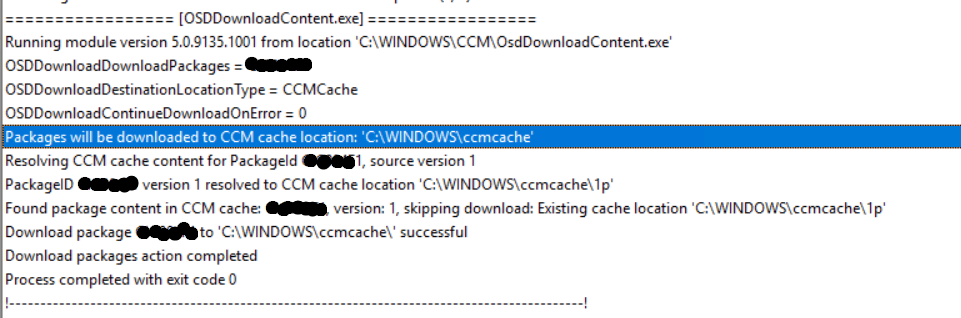
Hi Garth - there’s no error. But the issue is that RCT deleted ccmcache\1p - that folder no longer exists, but there’s still a lingering reference to it so that when SCCM runs the task sequence again, it thinks the files already exist in the cache so it does not download again.
Hi @GarthMJ - just making sure you spotted this. I did see the data from CacheInfoEx removed, but as soon as the task sequence restarted, these immediately reappeared, and the agent skipped the downloads again.
I was ooo at MMS conference, last week. I’m still not following you as to why you think there is a problem, particularly after looking at that log snip it… Exactly what problem are you trying to solve? e.g. exactly what problem is it causing you if it still sees the 1p folder?
Hi Garth - the issue is that WMI/SCCM client thinks that folder is still there, but it no longer exists on the disk. It is an orphaned reference. We are deploying a Task Sequence to precache several packages and such for a Windows in place upgrade. If for some reason the user interrupts this process and the OS download is not complete, we have to rerun the task sequence.
If we use the RCT option to clear the cache, the cache folder is emptied deleted and the WMI section you listed is blank. But as soon as we restart the task sequence, those wmi entries reappear despite the fact that ccmcache is empty. So the task sequence wrongly thinks that the folder still exists in the cache and will not initiate another download from the SCCM server.If we instead use the local CM UI in Control Panel to clear the cache, we do not see this behavior.
For tracking purposes, can you open a support ticket here Support Ticket Form - Recast (it is free for everyone), give them a short description of the issue and point them to this thread. Also reply back here and I will add my note to the ticket.