I realize that the community edition doesn’t receive support but maybe you will take a suggestion. When we do WOL it would be great if the list of ‘Unsuccessful’ computers listed them by name. The Successful column lists the names of the computers so why not the Unsuccessful.
Actually Community Edition does receive support. You can submit a ticket here. Support Ticket Form - Recast
However this seems like an Idea and you can create here. Feature Requests
BTW, however how exactly do you have WOL packets configured?? Even Computers that shouldn’t work for me work.
Our WOL is working with the default configuration. At least it’s working as well as SCCM is working. Our network department has been doing some security hardening and much of SCCM has been crippled. SCCM can reach certain computers but not others. I’ve tried explaining it to Networks and management but at the moment they aren’t seeing the problem. At some point we will get a request to do something to remote computers, and we’ll have to say we can’t do it because SCCM can’t reach the computers.
So it sound like you have several issues. When it comes to WOL, it should be fairly easy for the network team to see that WOL packet is sent to and received by endpoint.
As for rest of ConfigMgr, you can point your network team to the ports used by ConfigMgr. Ports used for connections - Configuration Manager | Microsoft Learn
There will be no simple way to “fix” things without the network team checking each item one at a time. They can use PowerShell to test connections between devices as need. For the most part ConfigMgr devices only need three ports, 443/80, 8530/8531, 10123.
For Recast standpoint, because you are using the Community version of RCT. You need a the port open that is required for what ever take you are using e.g. 135, 138, 445, etc… However if you ever purchase Enterprise edition you can use a single port, default is 444.
BTW, I just saw you Idea post, Can you post a screenshot or open a support case about the error issue with WOL functions. You might also get more details about the error within the logs. You can use this doc to enable debug logging.
HI Garth: It’s not an error. As you can see from this screen capture, the successful side shows the names of the computers but on the unsucessful side, the computer names aren’t shown. It would be helpful if the unsuccessful side showed the computer names as well. I do realize that this might not be possible.
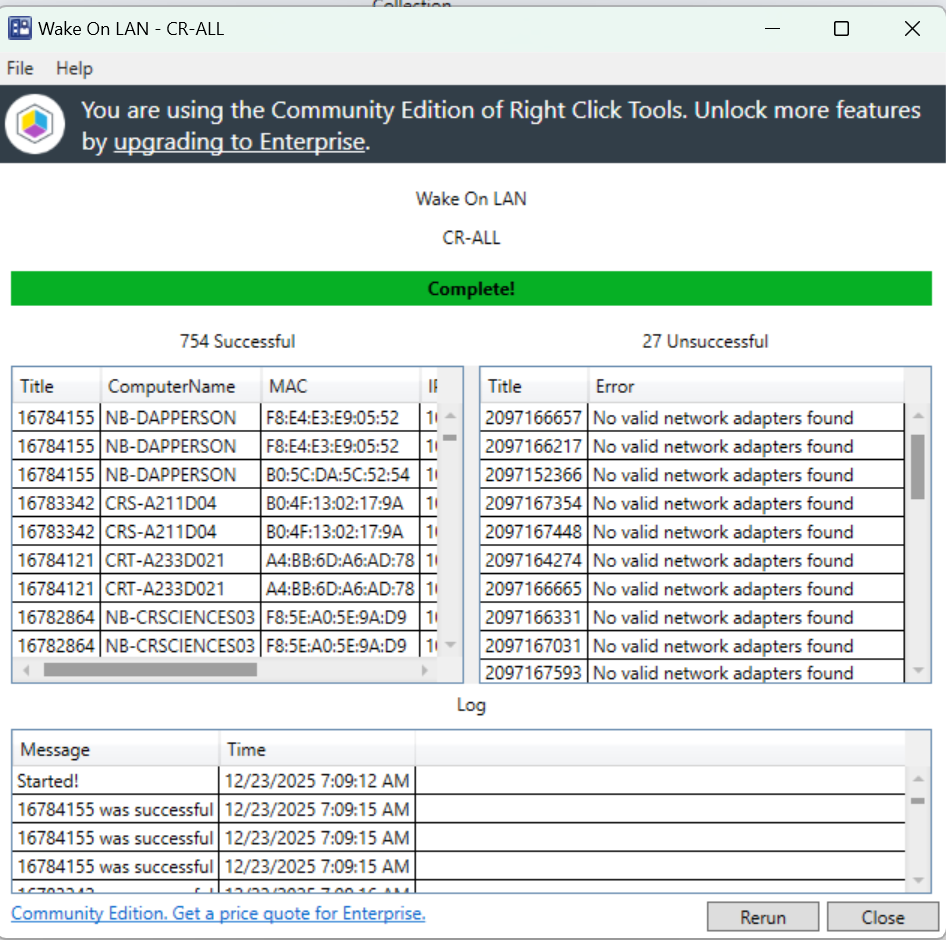
So there “title” is really the ResourceID. I (already) created a low priority bug to get that “fixed”. I will created a second one (81362) to have the NetBIOS Name added to the errors side.
BTW for those that want to see the NetBIOS name added to the “error” table. Please vote for it on the ideals portal. Details for unsuccessful Wake On Lan | Feature Requests
And Merry Christmas from the Great White North!
With Wake On Lan in RCT Community, this is what you’d expect. Failures show ResourceID instead of NetBIOS. This is a bug in the UI, not a problem with ConfigMgr or the network. The magic message only needs to be sent and hit the subnet for the rest to work. You should fix the bug so that NetBIOS is added when something fails. For now, you need to map ResourceID back to the device.
Agreed, can you please vote for the issue. the more votes that fast it will get fixed..